How to Resend an Invite to a User

Modified on Thu, 26 Mar at 6:26 AM

A team-mate have issues receiving their email? You can fix this issue quickly by just resending the invite. Here are the simple, step-by-step instructions to get your team members up and running.

1. Log in to the MYbOnline Portal.


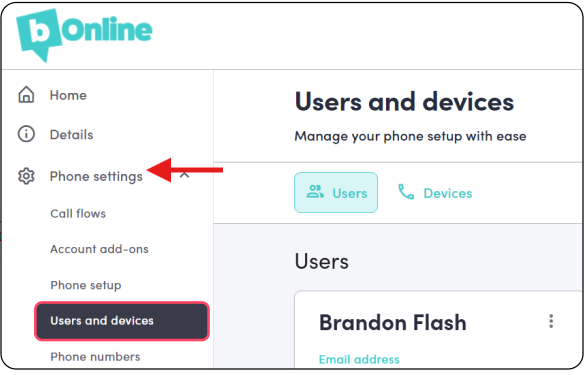
2. Click Phone Settings > Users and Devices

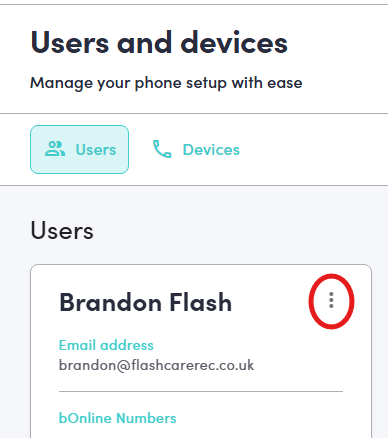
3. Click on the three vertical dots (more options menu) next to the relevant User Name

A screenshot of a "Users and devices" management dashboard. Under the "Users" tab, a red circle highlights a vertical three-dot "more options" menu icon on the right side of the user card.

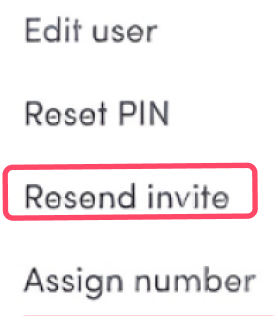
4. Click on Resend Invite

​A pop-up window titled "Reset PIN." Below the heading, there is a label that reads "New PIN" followed by six empty, square input boxes for entering a numerical code. At the bottom of the window, there is a grey "Cancel" button and a teal "Save" button.

Was this article helpful?

That’s Great!

Thank you for your feedback

Sorry! We couldn't be helpful

Thank you for your feedback

Let us know how can we improve this article!

Select at least one of the reasons
CAPTCHA verification is required.

Feedback sent

We appreciate your effort and will try to fix the article