Learn how to update your team members' details, including their name, email address, and extension number, in the MybOnline portal in a few simple steps.
Log in to the MybOnline Portal.
Click Phone Settings > Users and Devices
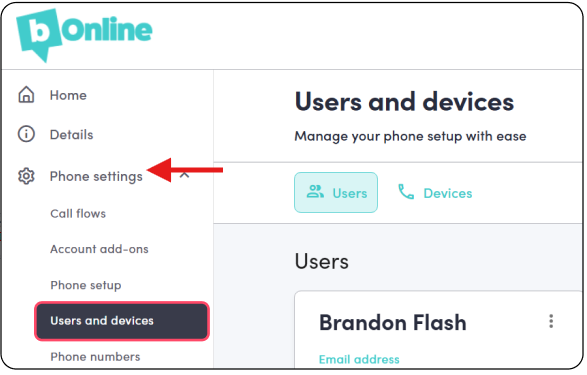
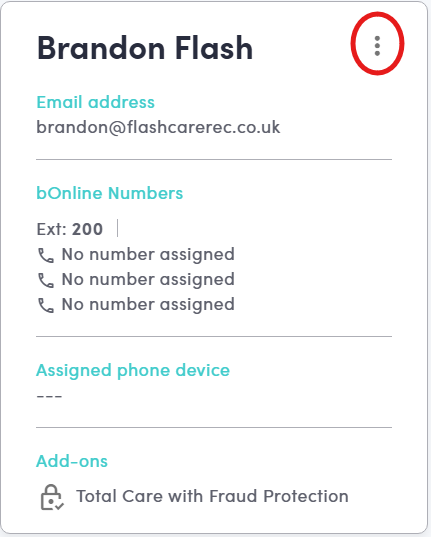
Click on the Edit Icon next to the user you want to update.
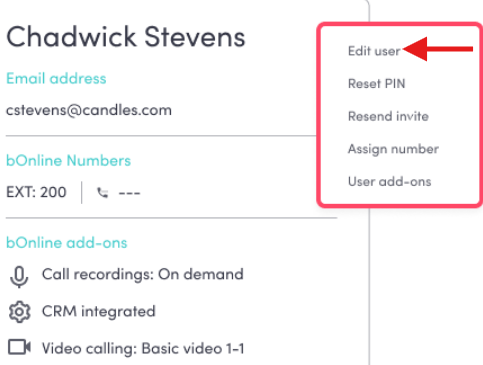
Select the Edit User option.
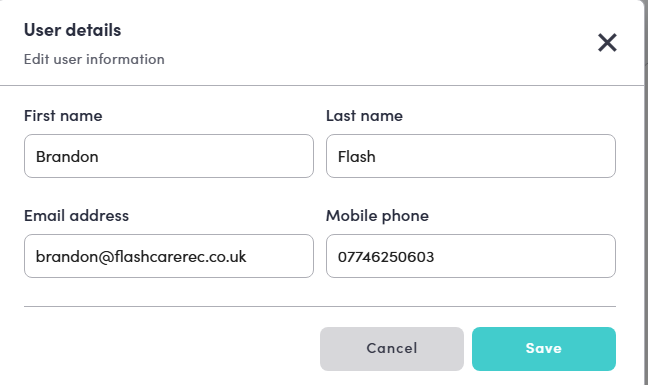
Update the necessary fields, such as the user's name, email address, or extension number, then save your changes.
Need to remove a user? Removing a user cannot be done directly in the portal. Please contact our support team and they will remove the user and update your account for you.
Contact Us
We're always up for a chat! Live chat is available via the mybOnline sidebar or from the bottom-right corner of this page.
Other Contact Options
Reach the support team via WhatsApp for quick queries.
Log in to mybOnline and use the in-portal contact options.
Was this article helpful?
That’s Great!
Thank you for your feedback
Sorry! We couldn't be helpful
Thank you for your feedback
Feedback sent
We appreciate your effort and will try to fix the article