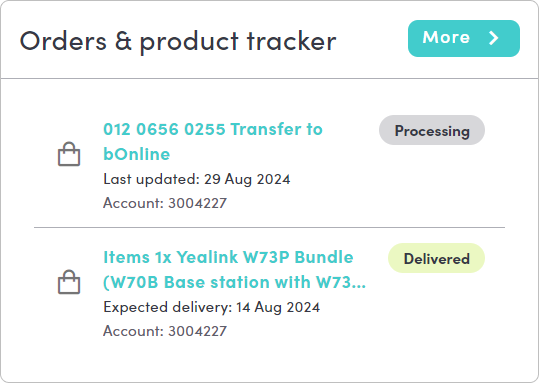
The Order Tracker in the MybOnline portal helps you keep track of your product or service orders in real time. You can see an order's current stage, upcoming steps, and any delays.
Please note: The tracker updates automatically as your order moves through each stage.How to Access the Order Tracker
Here are the steps to find and use it:
- Step 1 – Log in: sign in to the MybOnline portal with your account details.
- Step 2 – Go to Order Tracker: click on the Order Tracker section in the menu.
- Step 3 – Select order: choose the product or service order you want to track.
- Step 4 – Review status: check the current stage, upcoming steps, and estimated timelines.
- Step 5 – Stay updated: revisit the tracker to see live updates.
Benefits of Using the Tracker
Here are the advantages for customers:
- Keeps You Updated: always know where your order stands.
- Reduces Hassle: No need to call support for updates.
- Helps With Organising: helps you plan around installation or transfer dates.
- Gives You Clarity: reduces uncertainty by showing clear progress.
Related Articles
Contact Us
We're always up for a chat! Live chat is available via the mybOnline sidebar or from the bottom-right corner of this page.
Note: This is the fastest way to reach the support team.
Other Contact Options
WhatsApp
Reach the support team via WhatsApp for quick queries.
mybOnline Portal
Log in to mybOnline and use the in-portal contact options.
Was this article helpful?
That’s Great!
Thank you for your feedback
Sorry! We couldn't be helpful
Thank you for your feedback
Feedback sent
We appreciate your effort and will try to fix the article