The Voicemail Delay setting determines how long the phone rings before the caller is directed to your voicemail greeting. Here's how you can set up your voicemail delay.
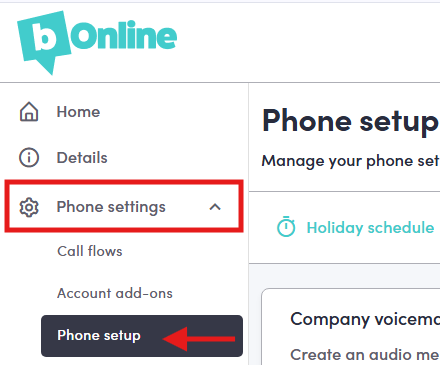
Step 1. Go to 'Phone Setup' on the left-hand menu.
- Log in to the MYbOnline portal,
- Click on Phone Settings
- Click on Phone setup
Step 2. Go to the Voicemail Delay Tab
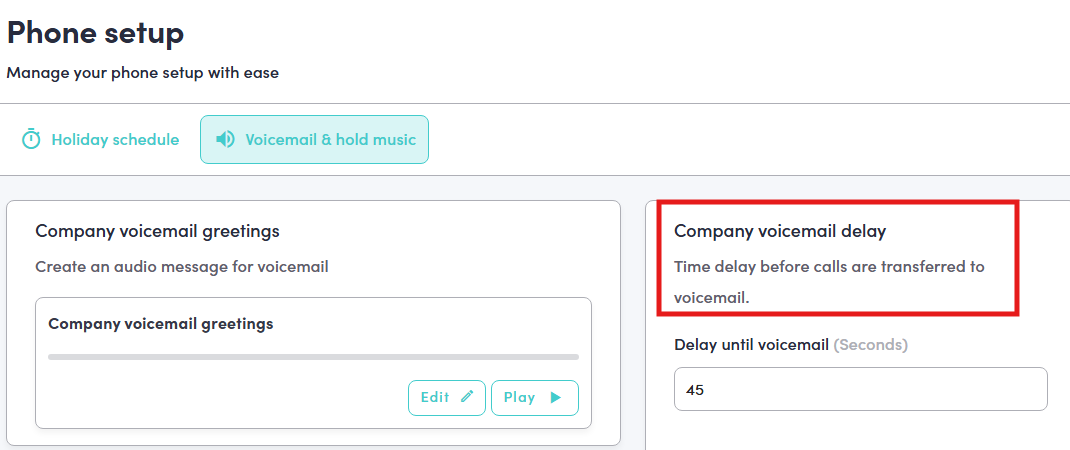
Click on the Voicemail & hold music tab
Scroll to Voicemail Delay
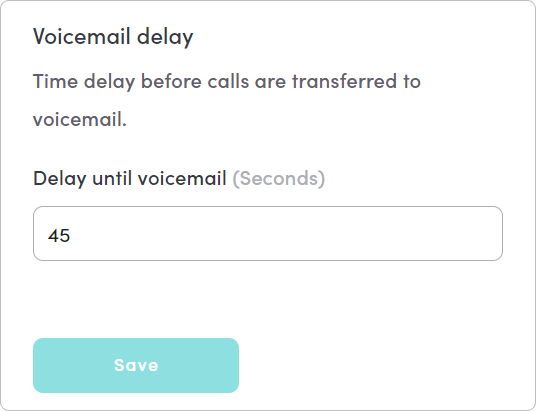
Step 3. Set the Voicemail Delay Duration
Set how long you would like the delay to last before the caller is transferred to voicemail.
Was this article helpful?
That’s Great!
Thank you for your feedback
Sorry! We couldn't be helpful
Thank you for your feedback
Feedback sent
We appreciate your effort and will try to fix the article